Your documents, from the first launch
Begin with an empty Untitled.md. Open or create documents in Files, and keep encrypted notes in the separate Vault. There is no fixed document count limit.
 What's new in 0.2.0
A native Mac editor. A local workspace.
Start with a blank Markdown document. Keep everyday files and private vault notes in their own collections, with everything on your Mac.
macOS 14+ · Apple Silicon · No account required
Version 0.2.0
This update brings a simpler first launch, clearer file organization, and improved saving for local documents and encrypted notes.
Begin with an empty Untitled.md. Open or create documents in Files, and keep encrypted notes in the separate Vault. There is no fixed document count limit.
Set a default Save As folder in Settings. It starts at Documents and is independent of the vault folder. Preferences stay local in ~/.qmacs/config.json.
Each document has its own Undo and Redo history. Saving preserves supported text encodings and checks for external file changes. Close and Quit prompt you about unsaved edits.
Vault format v2 authenticates security metadata. Saving retains the preceding encrypted vault as a backup; password changes preserve existing encrypted snapshot data.
Built for local trust
Files are ordinary plaintext documents on disk. Vault notes are saved inside encrypted vault.qmacs. Choose a vault folder and unlock it with your master password when you need protected notes; local file editing remains available while the vault is locked.
The Rust core uses Argon2id key derivation and XChaCha20-Poly1305 authenticated encryption. Master passwords are not saved in configuration; the unlocked app holds the password in memory for encrypted saves. Changing the password re-encrypts the vault and its existing encrypted snapshot data.
Vault creation and password rotation enforce password-strength checks. Optional TOTP or static-code verification adds a supplemental local unlock check. It does not provide an independent cryptographic factor against someone who has the vault file and master password.
Vault v2 authenticates security metadata alongside document contents. An existing vault's preceding encrypted file is retained as vault.qmacs.backup before replacement. A backup retained during password rotation still needs the previous password.
The app operates locally without an account or server. ML-KEM, ML-DSA, and network sync remain roadmap items. Read the vault and backup guidance →
RQmod syntax
Qmacs Editor includes an RQmod text mode and an MVP validator for `.rqmod` audit declarations. Describe targets, Transit / Use / Rest layers, scoring windows, backend settings, and requested outputs. These declarations do not execute a quantum backend or generate CBOM or QASM evidence.
audit "qmacs-vault-migration" {
  targets = ["vault.local", "sync-relay.internal"]

  layers {
    transit { tls, ssh, certs }
    use     { openssl, jwt, runtime }
    rest    { vault, backups, kms }
  }

  score qars_ni {
    mosca { t_protect="24mo"; t_data="10y" }
  }

  backend quantum { emit = qasm2; max_width = 3 }
  output { formats = [json, cbom, qasm] }
}
Editor appearance
Qmacs Editor supports themes across the editor, inspector, and syntax preview. It includes Light, Dark, and Qmacs palettes, plus a local JSON theme importer for custom editor colors. Syntax mode can stay automatic or be pinned to Plain Text, Markdown, Lisp, or RQmod.
audit "vault" {
  score qars_ni {
    mosca { t_quantum="96mo" }
  }
  theme = "custom-json"
}
Inside version 0.2.0
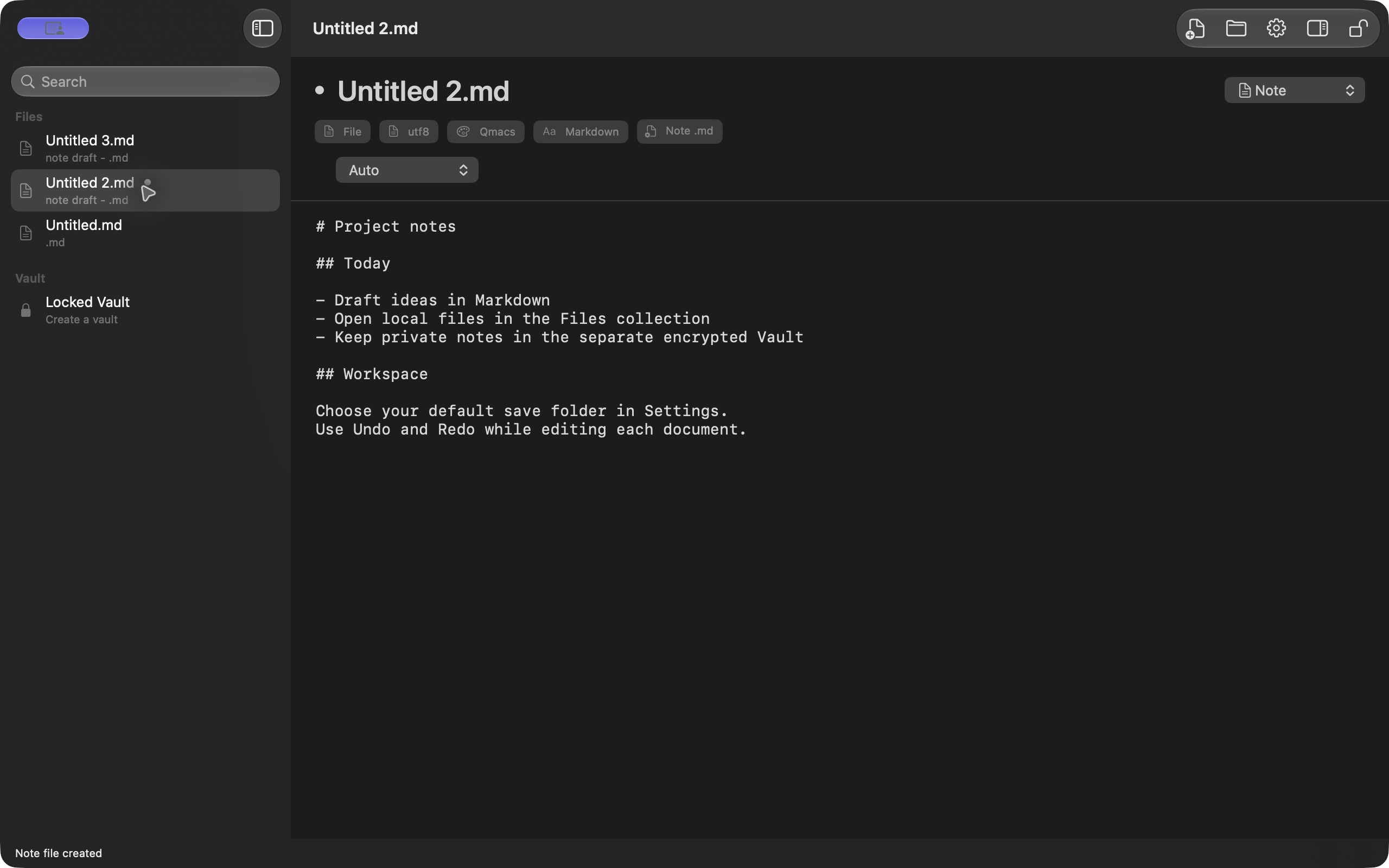
Actual screenshots from the local 0.2.0 release build, with sample Markdown text. Files and Vault remain separate collections.
Desktop workflows
Create a master-password vault, select its local folder, and unlock protected notes when needed.
Change the master password by writing a new encrypted verifier and re-encrypting vault.qmacs.
Add a local TOTP or static-code check to normal app unlock. Vault encryption remains protected by the master password.
Edit and preview Markdown, organize documents in the sidebar, and use native Open, Save As, and Rename dialogs.
Run small local queries for titles, tags, word counts, and status checks.
Check `.rqmod` declarations and inspect detected sections, requested output names, and warnings.
Themes are supported: switch Light, Dark, or Qmacs palettes and paste custom theme JSON locally.
A native sidebar, inspector, settings, keyboard commands, and document-specific Undo and Redo.
Release information
Version 0.2.0 (build 3) was submitted to Apple on . The submission was recorded as Waiting for Review. Public availability of this update depends on Apple approval.
Designed for macOS 14 or later. The submitted build targets Apple Silicon.